
Mad About Madeon
Madeon is a French electronic producer, who uses gadgets and technology like they’re an extension of his very being.
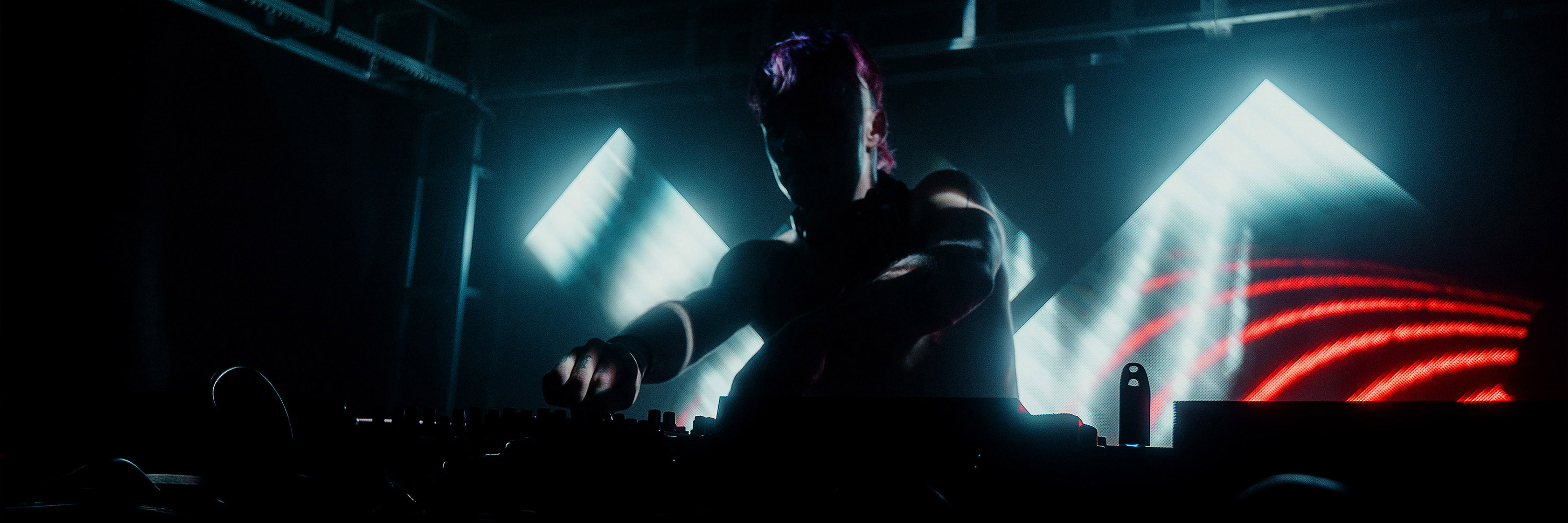
With an on stage setup that baffles even the best in the business, this 22 year old producer has reached where he is because of his focus on the audio-visual aspect of a performance, as a unit.
His stage setup should be trademarked. It’s a diamond with arrow- like shapes on either side.
All made of LED.
Geometric.
Symmetric.
Minimalist.
We, here at Resolume, couldn’t pass on the chance of understanding his rig and how he perfectly triggers his visuals to the music, live.
Thanks very much for speaking to us Hugo!
[fold][/fold]
First things first, the answer many have been curious to know, can you explain your live setup to us? All the gadgets you use and their purpose?
The show is run on two laptops which are on stage with me.
One runs the audio side of things in Ableton and sends MIDI through ethernet in real time to a second, dedicated video laptop running Resolume.
I have two Novation Launchpads to play musical parts and modify existing stems, one Novation Launchcontrol XL to handle some additional fx and general controls (including tempo) and a Korg SV-1 keyboard.
There is also a Xone K2 plugged into Resolume to control some video effects.
You do a great job of syncing your visuals to the music. Can you explain to us how you do this with Resolume?
All of the audio clips and parts in Ableton are grouped with matching MIDI clips that trigger videos and effect in Resolume.
All of the editing is done in real time, it's really useful as it means I can edit the video show easily between shows by simply changing the MIDI score.
It also means that I can improvise, extend or shorten a section, with the knowledge that the video show will keep up.
We have noticed some LED strips being used in your setups. Do you control DMX fixtures with Resolume as well?
No, we haven't explored this yet but i'm looking forward to it! At the moment, all of the fixtures are triggered manually (no timecode, shoutout to Alex Cerio!)
We really like the pixel mapping of the buttons on your Launchpads. Tell us about this.
This is a simple MIDI score sent to the Launchpad to animate it. Novation kindly built custom Launchpads for me with unique firmware features enabling me to switch between this type of "animation" mode and a regular functioning mode seamlessly.
Audio-visuals is so important to you- sometimes the content looks like the launchpad. It’s gotta be intentional?
Absolutely! For the 2012 shows, there were sections of the show where the screen matched the Launchpad completely. There were also pixel-style grid animations that were completely in real-time (with 64 layers in Resolume for each of the 64 pad), each pad corresponding to a different MIDI note. Very fun to program!
What thought process do you go through while creating visuals in your studio? What software do you use? How long does it take for you to prepare a render/ clip?
I work with a number of companies on making the content for the show but I make the content for about a third of the show.
I mostly use After Effects. I'm not very familiar with 3D softwares so I make 3D animations in AE polygon by polygon which is quite excruciating!
I like to keep making content on tour as new ideas occur to me, it's always a work in progress.
Give us a rundown of your studio equipment. What is an absolute must-have?What would you like to change/ upgrade?
A great computer has to be the most indispensable gear.
Whenever I upgrade, my production style always seems to adapt to use more plugins until I reach the limit again, it's constant frustration!
A zero-latency, unlimited-resources dream computer would be the best imaginable upgrade.
Why did you pick Resolume over the other software available out there?
Resolume reminded me a lot of audio softwares I was already familiar with.
It's intuitive and powerful, the effects are extremely usable and the latest updates in Arena 5 added mapping options that enabled my latest "diamond/chevron" LED setup.
With this, we come to the end of this interview.
Thanks much for taking the time out to do this Hugo, we are all very grateful.
Our hunger for technology and the things you can do with it has been duly satiated. For now.
Time to go try all of this out now, eh? :)
You can check out Madeon's work here: [video]https://www.youtube.com/watch?v=D3upMS3MjWo&list=RDD3upMS3MjWo[/video]
Photo Cred: Charles Edouard Dangelser
With an on stage setup that baffles even the best in the business, this 22 year old producer has reached where he is because of his focus on the audio-visual aspect of a performance, as a unit.
His stage setup should be trademarked. It’s a diamond with arrow- like shapes on either side.
All made of LED.
Geometric.
Symmetric.
Minimalist.
We, here at Resolume, couldn’t pass on the chance of understanding his rig and how he perfectly triggers his visuals to the music, live.
Thanks very much for speaking to us Hugo!
[fold][/fold]
First things first, the answer many have been curious to know, can you explain your live setup to us? All the gadgets you use and their purpose?
The show is run on two laptops which are on stage with me.
One runs the audio side of things in Ableton and sends MIDI through ethernet in real time to a second, dedicated video laptop running Resolume.
I have two Novation Launchpads to play musical parts and modify existing stems, one Novation Launchcontrol XL to handle some additional fx and general controls (including tempo) and a Korg SV-1 keyboard.
There is also a Xone K2 plugged into Resolume to control some video effects.
You do a great job of syncing your visuals to the music. Can you explain to us how you do this with Resolume?
All of the audio clips and parts in Ableton are grouped with matching MIDI clips that trigger videos and effect in Resolume.
All of the editing is done in real time, it's really useful as it means I can edit the video show easily between shows by simply changing the MIDI score.
It also means that I can improvise, extend or shorten a section, with the knowledge that the video show will keep up.
We have noticed some LED strips being used in your setups. Do you control DMX fixtures with Resolume as well?
No, we haven't explored this yet but i'm looking forward to it! At the moment, all of the fixtures are triggered manually (no timecode, shoutout to Alex Cerio!)
We really like the pixel mapping of the buttons on your Launchpads. Tell us about this.
This is a simple MIDI score sent to the Launchpad to animate it. Novation kindly built custom Launchpads for me with unique firmware features enabling me to switch between this type of "animation" mode and a regular functioning mode seamlessly.
Audio-visuals is so important to you- sometimes the content looks like the launchpad. It’s gotta be intentional?
Absolutely! For the 2012 shows, there were sections of the show where the screen matched the Launchpad completely. There were also pixel-style grid animations that were completely in real-time (with 64 layers in Resolume for each of the 64 pad), each pad corresponding to a different MIDI note. Very fun to program!
What thought process do you go through while creating visuals in your studio? What software do you use? How long does it take for you to prepare a render/ clip?
I work with a number of companies on making the content for the show but I make the content for about a third of the show.
I mostly use After Effects. I'm not very familiar with 3D softwares so I make 3D animations in AE polygon by polygon which is quite excruciating!
I like to keep making content on tour as new ideas occur to me, it's always a work in progress.
Give us a rundown of your studio equipment. What is an absolute must-have?What would you like to change/ upgrade?
A great computer has to be the most indispensable gear.
Whenever I upgrade, my production style always seems to adapt to use more plugins until I reach the limit again, it's constant frustration!
A zero-latency, unlimited-resources dream computer would be the best imaginable upgrade.
Why did you pick Resolume over the other software available out there?
Resolume reminded me a lot of audio softwares I was already familiar with.
It's intuitive and powerful, the effects are extremely usable and the latest updates in Arena 5 added mapping options that enabled my latest "diamond/chevron" LED setup.
With this, we come to the end of this interview.
Thanks much for taking the time out to do this Hugo, we are all very grateful.
Our hunger for technology and the things you can do with it has been duly satiated. For now.
Time to go try all of this out now, eh? :)
You can check out Madeon's work here: [video]https://www.youtube.com/watch?v=D3upMS3MjWo&list=RDD3upMS3MjWo[/video]
Photo Cred: Charles Edouard Dangelser
Resolume Blog
This blog is about Resolume, VJ-ing and the inspiring things the Resolume users make. Do you have something interesting to show the community? Send in your work!
Highlights
Super Quick Review: Samson Conspiracy
As you all know, Resolume stacks layers vertically. To us, it always felt a bit weird to control those layers with a midi controller that puts its faders horizontally. So we got this little guy in the office because we liked the vertical fader layout, and wanted to see if it was a good match for Resolume.
[fold][/fold]
The good news is that the Samson Conspiracy is a regular USB midi controller, so it pops right up in Resolume and works out of the box. Even the XY pad can be assigned to do fun Kaosspad type of stuff.
The rotaries are the same faux endless controls that most midi controllers have these days. They send out regular 0...127 midi cc data, but can be spun endlessly. They don't respond to midi feedback though. This sucks when using layer focus mapping to map the same rotary to different controls. For instance, you could map it to the active clip speed. When you then switch between clips, the control won't update to the speed value of the current clip in Resolume. So when turning the knob, the speed value will jump to whatever value is set to.
A great thing is that the rotaries are velocity sensitive. When you turn them quickly, you can cover the whole range of 0 to 127 in one turn. But when you turn slowly, the sensitivity increases, and you can very precisely adjust the values with increments of 1. Pretty nifty.
After doing a couple of mixes with it, I get why most controllers put their faders horizontally. This may be a personal thing, but my mixing style is mostly fading layers in and out rhythmically, while occasionally triggering effects with the pad. I quickly found myself turning the controller 90 degrees to get the faders horizontal again. Somehow, it feels more natural to my hands that way.
Even then, theres is a set of rotaries between faders and pads, very close to the end of the fader. This is both annoying when fading all the way up, as well as when switching from fader to pad and back. Also, most of my show compositions are built up of 8 layers of content, composited together with alpha channels to create the particular look I need for that stage. 4 faders is just not enough control for me.
All in all it's a great controller, but not my style. I guess we'll just have to make Resolume with a horizontal layer layout instead :)
http://www.samsontech.com/samson/products/usb-midi/controllers/conspiracy/
The good news is that the Samson Conspiracy is a regular USB midi controller, so it pops right up in Resolume and works out of the box. Even the XY pad can be assigned to do fun Kaosspad type of stuff.
The rotaries are the same faux endless controls that most midi controllers have these days. They send out regular 0...127 midi cc data, but can be spun endlessly. They don't respond to midi feedback though. This sucks when using layer focus mapping to map the same rotary to different controls. For instance, you could map it to the active clip speed. When you then switch between clips, the control won't update to the speed value of the current clip in Resolume. So when turning the knob, the speed value will jump to whatever value is set to.
A great thing is that the rotaries are velocity sensitive. When you turn them quickly, you can cover the whole range of 0 to 127 in one turn. But when you turn slowly, the sensitivity increases, and you can very precisely adjust the values with increments of 1. Pretty nifty.
After doing a couple of mixes with it, I get why most controllers put their faders horizontally. This may be a personal thing, but my mixing style is mostly fading layers in and out rhythmically, while occasionally triggering effects with the pad. I quickly found myself turning the controller 90 degrees to get the faders horizontal again. Somehow, it feels more natural to my hands that way.
Even then, theres is a set of rotaries between faders and pads, very close to the end of the fader. This is both annoying when fading all the way up, as well as when switching from fader to pad and back. Also, most of my show compositions are built up of 8 layers of content, composited together with alpha channels to create the particular look I need for that stage. 4 faders is just not enough control for me.
All in all it's a great controller, but not my style. I guess we'll just have to make Resolume with a horizontal layer layout instead :)
http://www.samsontech.com/samson/products/usb-midi/controllers/conspiracy/